Whenever our church plays yut nori, the traditional Korean stick-throwing board game, the same thing happens. The sticks fly, people shout, and the only people who can actually see the board are the four standing right over a sheet of paper on the floor. Everyone else just asks, “Wait, who’s winning?”
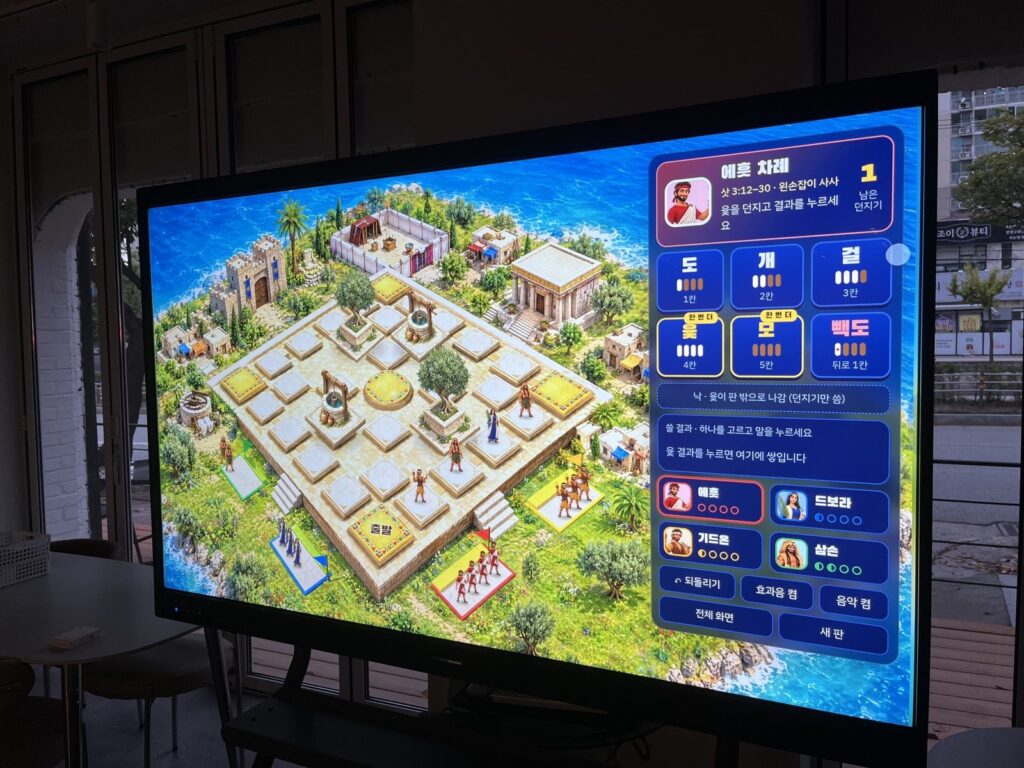
So on Saturday, September 26, 2026, I sat down with Claude (Anthropic’s AI coding assistant) and a couple of AI image and music tools to fix that. The goal was simple: people keep throwing real sticks, and the result gets tapped on our classroom display so the pieces move on a big, beautiful board everyone can see.
By the end of the day it was running on our church’s touchscreen. This is the honest build log: what worked, and the parts that broke along the way.
A 30-second primer on yut nori
If you have never played: you toss four half-round sticks. How many land flat side up tells you how far to move: 1 (do), 2 (gae), 3 (geol), 4 (yut), or 5 (mo). A yut or mo earns another throw. One marked stick gives back-do, one step backward. Teams race their pieces around a board of 29 stations, and the fun comes from three rules: land on an opponent and you send them home, land on your own piece and you can carry it with you, and take a shortcut through the middle if you stop on a corner.
In Korea it is the game of holidays and church picnics. It’s also loud, and that was exactly what I wanted to keep. The screen doesn’t throw the sticks. People do.
Step 1: A plain board that just works
The first version was a flat, simple web page. You choose how many teams, tap the throw result, pick a piece, and it hops station to station. Catching, carrying, bonus throws, shortcuts and undo were all in there. It took a couple of rounds of feedback and it worked, which made me greedy. I asked Claude to keep that version untouched and start a second one using the same rules.
Step 2: Turning the pieces into judges
Our church is in the middle of a fall sermon series through the book of Judges, so the pieces became four judges. I generated the characters with an AI image tool (Higgsfield, using its GPT Image model), and I was specific that each one had to carry the detail the Bible gives us, so nobody needs a legend to tell them apart:
- Ehud: a short sword in his left hand (Judges 3:12–30)
- Deborah: an Israelite woman judge with a palm branch (Judges 4–5)
- Gideon: a torch in one hand and a ram’s horn in the other (Judges 7)
- Samson: muscular, wearing a lion’s mane pelt (Judges 14)
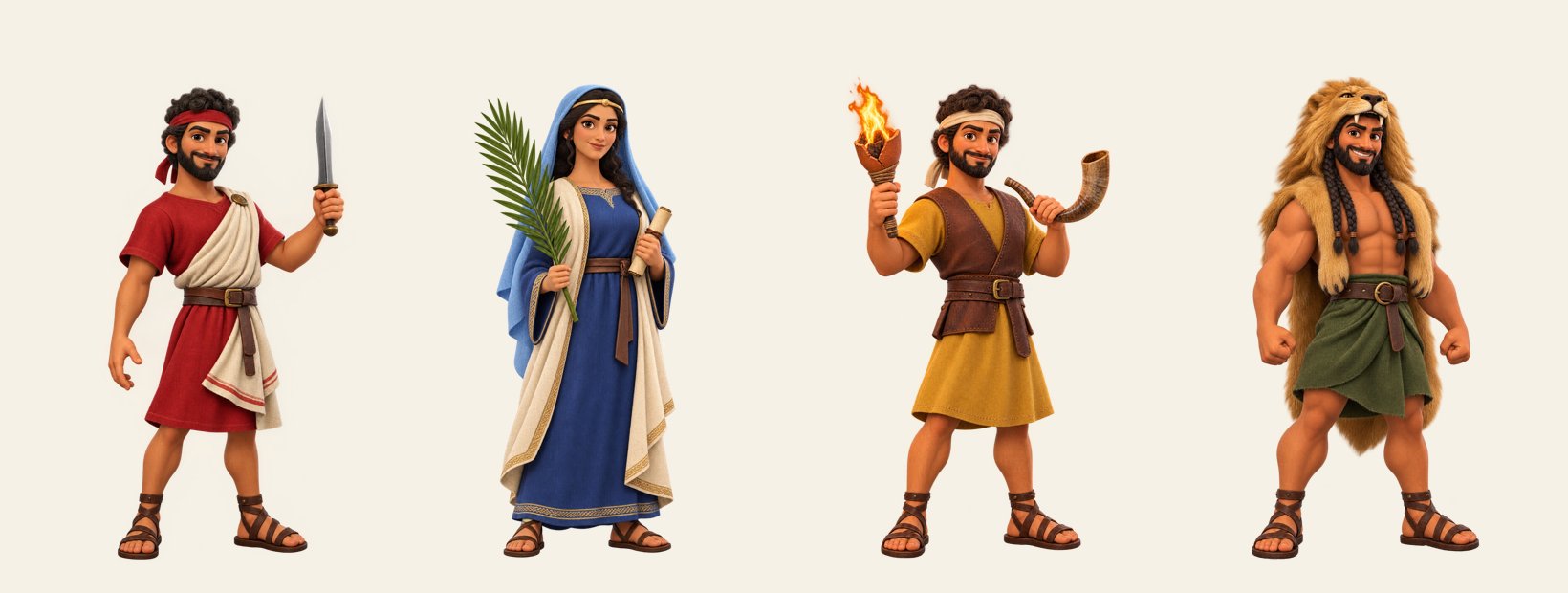
That list is the part of the project I would never hand over to AI. The tools can draw anything, but deciding what a child should notice about Ehud is a teaching decision.
Step 3: The 3D version that didn’t feel right
Next I asked for something like the Korean mobile game Modoo Marble: a 3D island with the board on top. Claude built it in three.js, and technically it worked. It just looked wrong. The code-drawn 3D board and the painted characters came from two different worlds. There was also a flicker problem: text and shadows on the board shimmered. That turned out to be a camera depth setting (the near plane was set far too close), and fixing it was quick. Fixing the look was not.
So we changed approach. Instead of drawing the board in code, we painted the whole board as a single image and only animate the pieces on top of it. The trick that made this possible: Claude rendered the 3D board from the exact camera angle we wanted and handed that rough render to the image model as a reference. The painting came back with the tiles almost exactly where the 3D version had them, which meant the piece coordinates from the 3D math still mostly lined up.
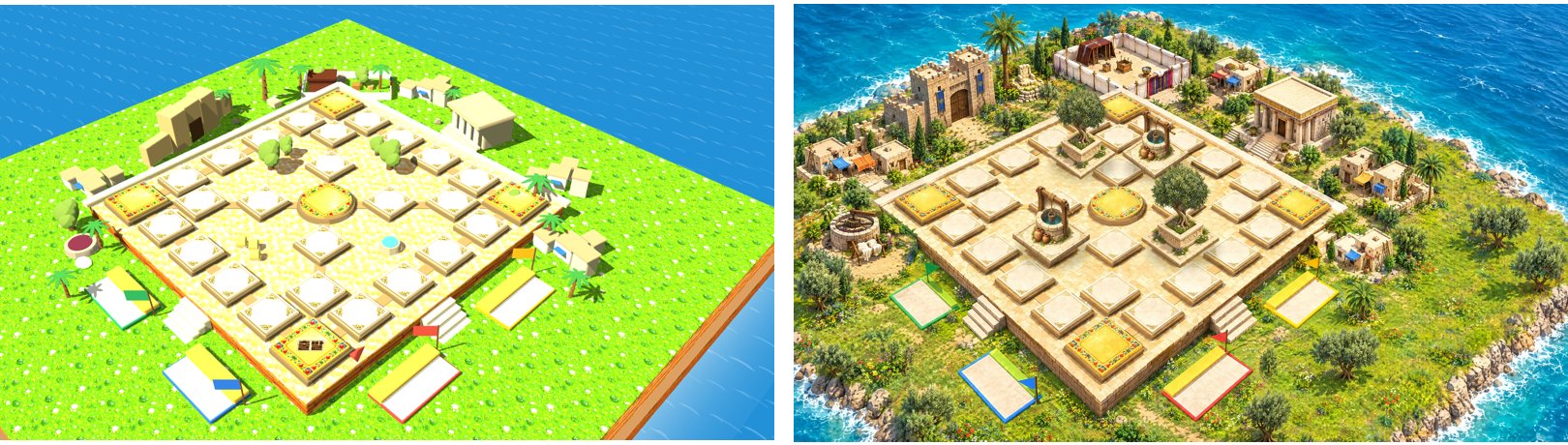
I also asked for specific landmarks and which way they face: the tabernacle entrance toward 3 o’clock, a temple toward 8, a city gate toward 4, and a couple of extra villages. I’ll be honest: after several attempts the tabernacle still doesn’t face exactly 3 o’clock. Image models are good at “a tabernacle”, and much weaker at “a tabernacle rotated to this angle.”
Step 4: Designing for the actual screen
The board runs on a 16:9 classroom display, never on a phone. My first request to “fit it to 16:9” was misunderstood: the square painting was stretched sideways and looked worse than before. What I actually meant was fill the whole screen with the painting and float the menu on top of the scenery on the right. We threw that version away and painted a new 16:9 board from scratch, with bigger characters to match. Explaining a visual idea in words is harder than it sounds, even to an AI.
Step 5: The four tiles that shouldn’t exist
This was the most interesting failure. A yut board has 29 stations. The painting had 33. The image model had turned some decorations from the 3D reference into four extra tiles near the center, and they looked just like the real ones. I didn’t notice until we’d been testing for a while.
Repainting would have reshuffled everything, so we covered them instead. We generated an olive tree and a stone well as cut-out images and composited them over the four fake tiles. Now nobody will try to move a piece there, and the square honestly looks better for it.
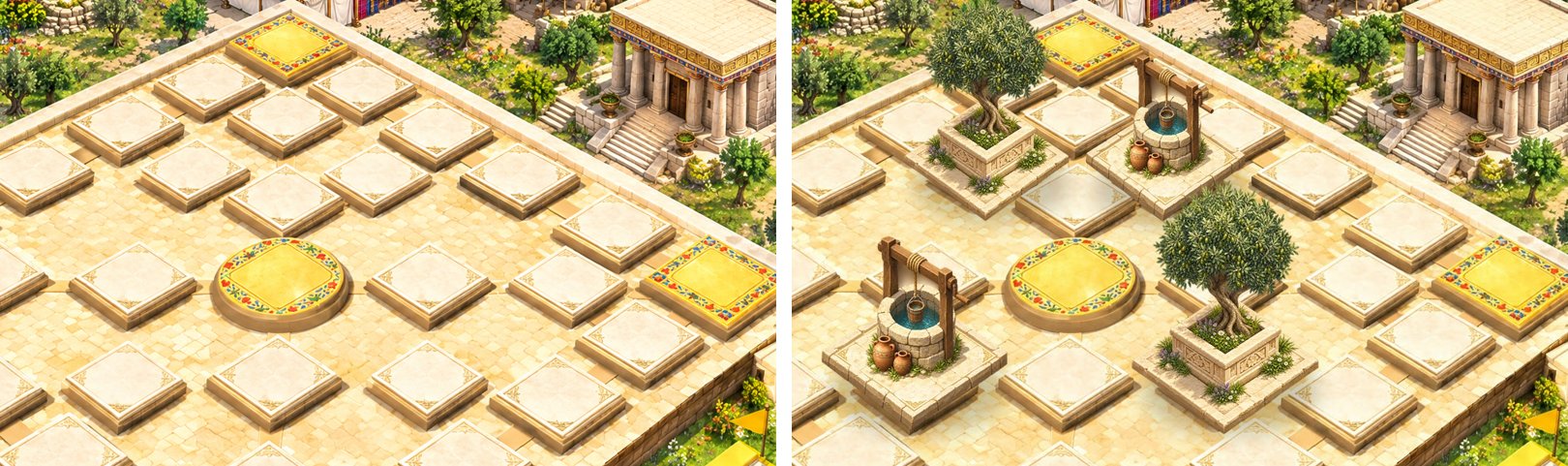
The real tiles had drifted too: a few were off by tens of pixels. Claude found the bright tile tops in the image automatically and corrected most of them. For the last bit, I asked for a calibration mode. I drag each station marker onto the painted tile with my own eyes, copy the offsets, and they get baked into the code. The AI got it about 90% of the way there, and the last 10% was my eyes and my finger.
One lesson for anyone doing this: the calibration lived in the browser’s local storage, and during testing my assistant cleared that storage and wiped my adjustments. It restored them, but now the offsets live in the code itself, not only in a browser.
Step 6: Music, and a footstep that was too heavy
Background music took three tries. Two AI-generated tracks missed what I had in my head, so I opened Suno and made it myself. My brief was a fantasy-style orchestra with a IV–V–iii–vi–I chord progression looping underneath. The track I kept ends quietly and starts quietly, so Claude crossfaded the last three seconds into the beginning with ffmpeg. The page now loops it with no audible seam.
I made six sound effects in Suno too: a footstep for each station, a harp for a bonus throw, brass for a capture, horns for carrying a piece, a fanfare when a piece gets home, and a big fanfare when a team wins. The footstep was my favorite at first and my biggest mistake. A sound you hear hundreds of times a game has to be small. We trimmed it twice, cutting the low end and the volume, until it became a light tap on dirt instead of a stomp.
How a game runs

- Open the page on the big screen and tap once. Browsers won’t play sound until someone touches the page.
- Pick the teams (judges), the number of pieces, and the finishing rule.
- A team throws real sticks. The operator taps the result, then taps the piece to move.
- With a keyboard it’s faster: 1–5 for the results, 0 for back-do, N for a throw off the mat, Z to undo.
It’s hosted as a static site on Vercel under a subdomain of our church’s domain, so any screen with a browser can open it. You can try it here: yut.isdreamchurch.co.kr. The interface is in Korean, but the tiles and pieces speak for themselves.
Tools I used
- Claude Code: all of the code, image calibration, audio editing and deployment
- Higgsfield (GPT Image model): the characters, the painted board, the tree and well cut-outs
- Suno: the background music and the six sound effects
- Vercel: free static hosting, connected to our church domain
What I learned
AI made this possible for a small church with no media team. A day’s work produced something I could never have commissioned. But at every step, the part that mattered was a judgment call only a person could make: which way the tabernacle should face, whether a tile was a few pixels off, whether a footstep was too loud, and what a child should remember about Ehud.
Judges ends by describing a time when everyone did what was right in their own eyes. My hope is simpler than that. When our people crowd around this screen laughing and shouting, I hope the names Ehud, Deborah, Gideon and Samson get said out loud a few more times than they otherwise would have.