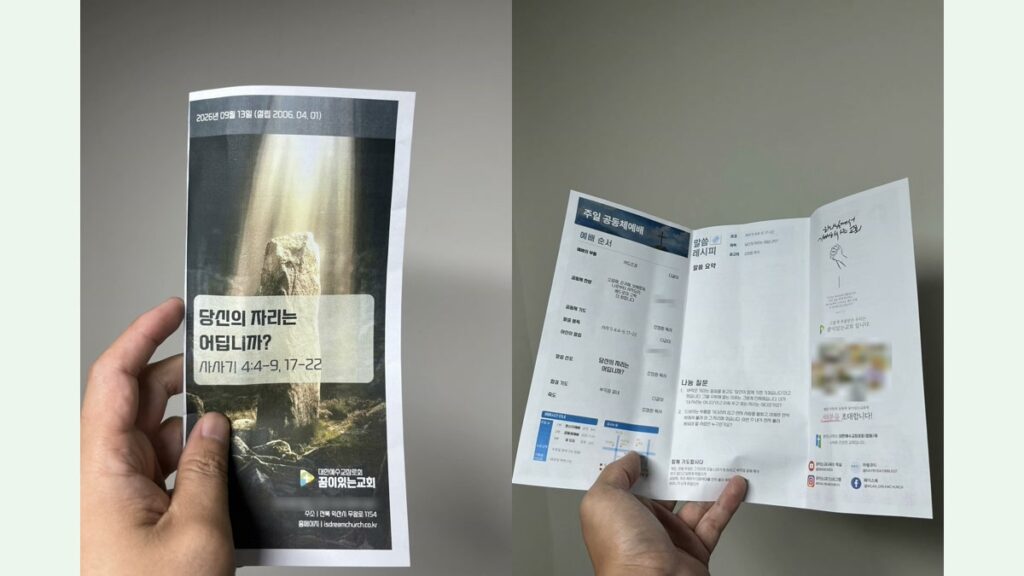
Every Saturday night for about six years, I opened the same design template and rebuilt our church bulletin by hand. Front and back of a single A4 sheet, folded into three panels each, so six panels in total. I would change the date, the sermon title, the order of worship, and the announcements, then read all six panels one more time before sending it to the printer.
The mistake was always in the same place. One week I changed the date and the sermon title, and last week’s preacher was still sitting there in the order of worship. Nobody said anything. That somehow made it worse.
Here is the thing I eventually understood: my problem was never design. Our template looked fine. The problem was that nothing in my process separated what changes every week from what never changes. All six panels sat in front of me with equal weight, every single week, and my attention had to do the sorting. Attention is exactly what you don’t have at 1 a.m.
This is the honest build log of replacing that Saturday night with a text file — what worked, what broke, and the failure I caught the night before a Sunday.
What the bulletin actually is
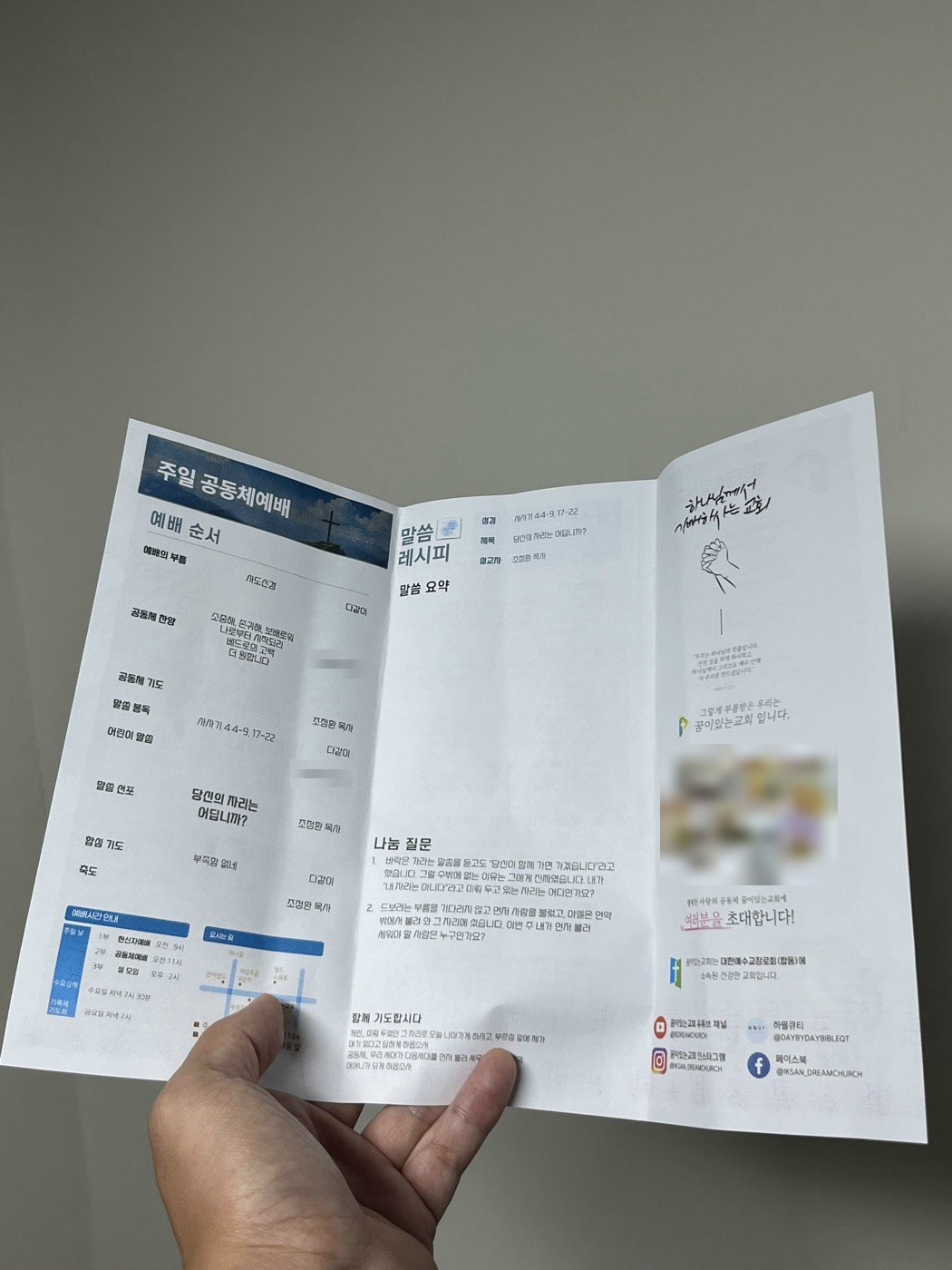
If your church uses a simple folded program, this will sound familiar. Ours has six panels:
- Cover — sermon title, passage, preacher, a photo, the date
- Announcements — usually six to eight items, and the one panel that genuinely changes shape week to week
- Order of worship — songs, prayers, Scripture reading, who is leading what
- Sermon notes — a short summary plus discussion questions and prayer points
- About our church and an invitation panel — these two had not changed in years
So: three panels of real work, one panel of layout gymnastics, and two panels I reread every week out of pure habit. The first design decision was to stop treating those last two as design at all. I cropped them out of the original 600 dpi export once and froze them as image assets. They are never redrawn. If they ever need to change, that is a separate job on a separate day.
Version 1: one text file, HTML, and headless Chrome
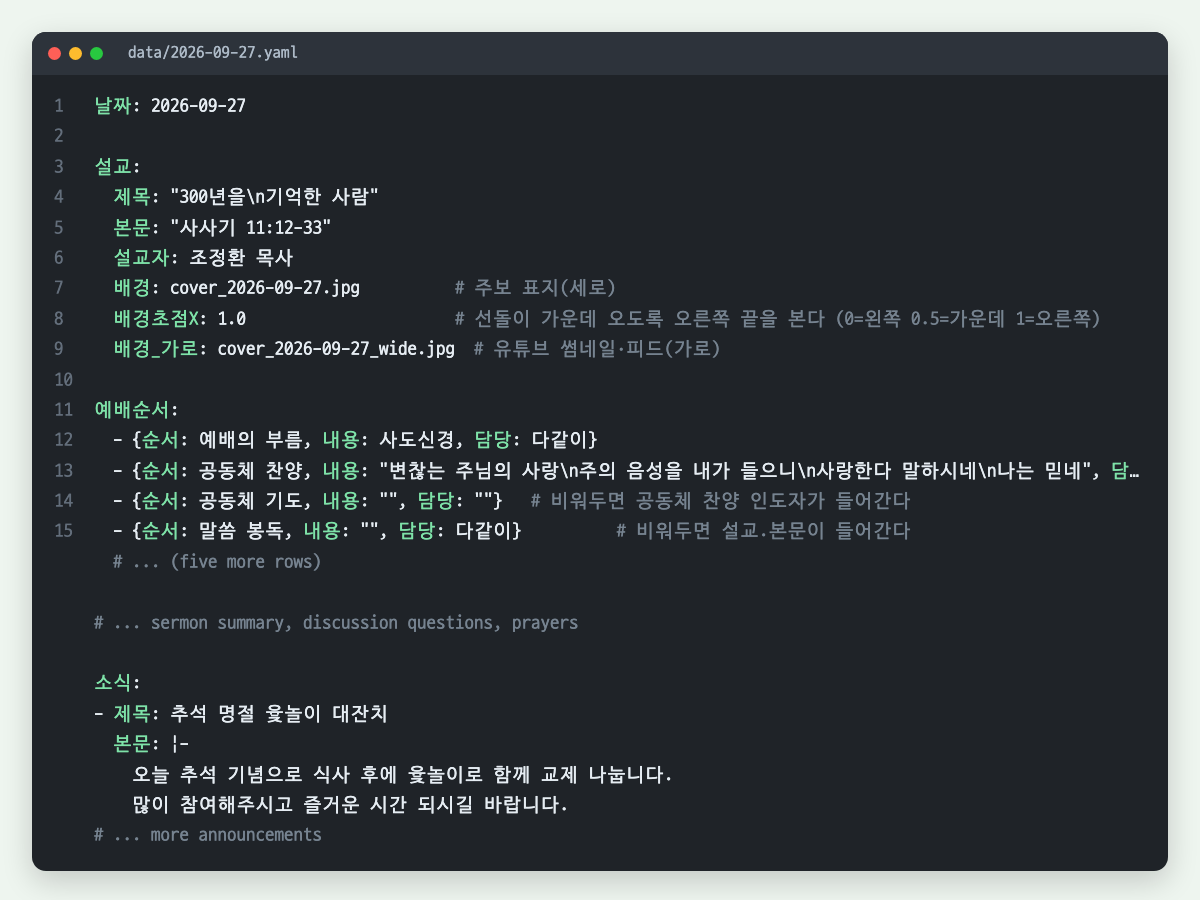
The first build (August 2026) was straightforward. Everything that changes weekly goes into a single YAML file — date, sermon, order of worship, summary, questions, announcements. A template renders it to HTML, and headless Chrome prints that to PDF at print resolution.
Two decisions from that week are the ones I would keep if I started over.
I measured instead of eyeballing. I took the original 600 dpi export and measured actual ink height in pixels, then converted: ink height divided by 0.945 for our body typeface gives the font size. The old template’s row spacing in the order of worship ranged from 8.1 mm to 14.9 mm because a human had nudged each row by hand. The automated version distributes them evenly, which is not a compromise — it is the part that got better.
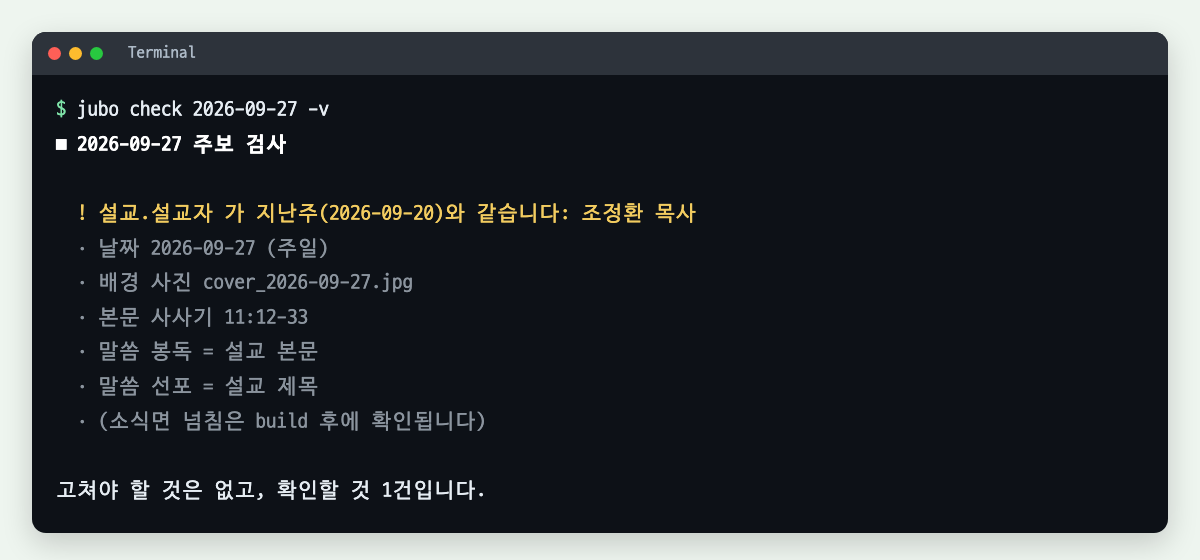
I wrote the checker before I trusted the generator. A check command reads the week’s file and complains: no cover photo, empty fields, and — the one that matters — the preacher is the same as last week’s. That is not a bug in the data. It is a question. My original failure mode is now something the machine asks me about every single week, and I answer it on purpose instead of missing it by accident.
What broke in version 1
Four things, and three of them failed silently, which is the category worth writing down.
macOS sips ignored my crop offset. I was cropping panels out of the big source image with sips --cropOffset, and it kept center-cropping no matter what I passed. Reordering the arguments changed nothing. No error, just the wrong region. I switched to ffmpeg’s crop=w:h:x:y and it has been correct ever since.
The template engine broke my fonts by being helpful. Jinja2 escapes HTML by default, and my font family name went into CSS with quotes around it. Those quotes came out the other side as '. CSS does not throw an error for a font name it cannot parse — it just quietly falls back to something else. The PDF rendered fine. It was simply in the wrong typeface, and I did not notice for a while. Anything that lands in CSS now gets marked as safe explicitly.
Headless Chrome, four separate ways. The old --headless flag now hangs; you need --headless=new. If it shares a profile directory with the Chrome I actually use, it hangs. Capturing its output through a pipe deadlocks, because a child process holds the pipe open and never lets go. And the strangest one: Chrome finishes writing the PDF and then refuses to exit. The file is complete and valid, the process just sits there. I lost more than ten minutes one night waiting on three stages that had each already finished. The fix is unglamorous — confirm the file is complete (check for the PDF’s %%EOF marker), then kill that specific process by name.
Shrinking overflowing text by iteration does not converge. Some weeks the announcements panel has six items, some weeks nine. My first fix was a loop: apply a zoom factor, measure the height again, reduce, repeat. It never settled. The reason is that scrollHeight reports in the element’s own coordinate system, so zooming the element does not change the number you are measuring — you are reading the same value forever. The working version measures the overflow ratio once, applies a single CSS transform, and widens the column by the same factor so the panel stays full.
Version 2: the automation was too finished
By September the pipeline worked. And that created a problem I did not expect.
The output was a flat image. Every word was baked into pixels. So when I looked at Saturday’s bulletin and wanted to nudge one line — move a heading down two millimeters, shorten one announcement — I had exactly two options: edit the data and regenerate everything, or accept it. What I actually wanted was to open the file and move the thing.
So I rebuilt the renderer on top of Pixelmator Pro, driven through AppleScript. Same measurements, same layout, but now every element is a real, editable layer with a human-readable name, and the project file is saved alongside the PDF. One announcement is one layer. If I want to move it, I open it and move it.
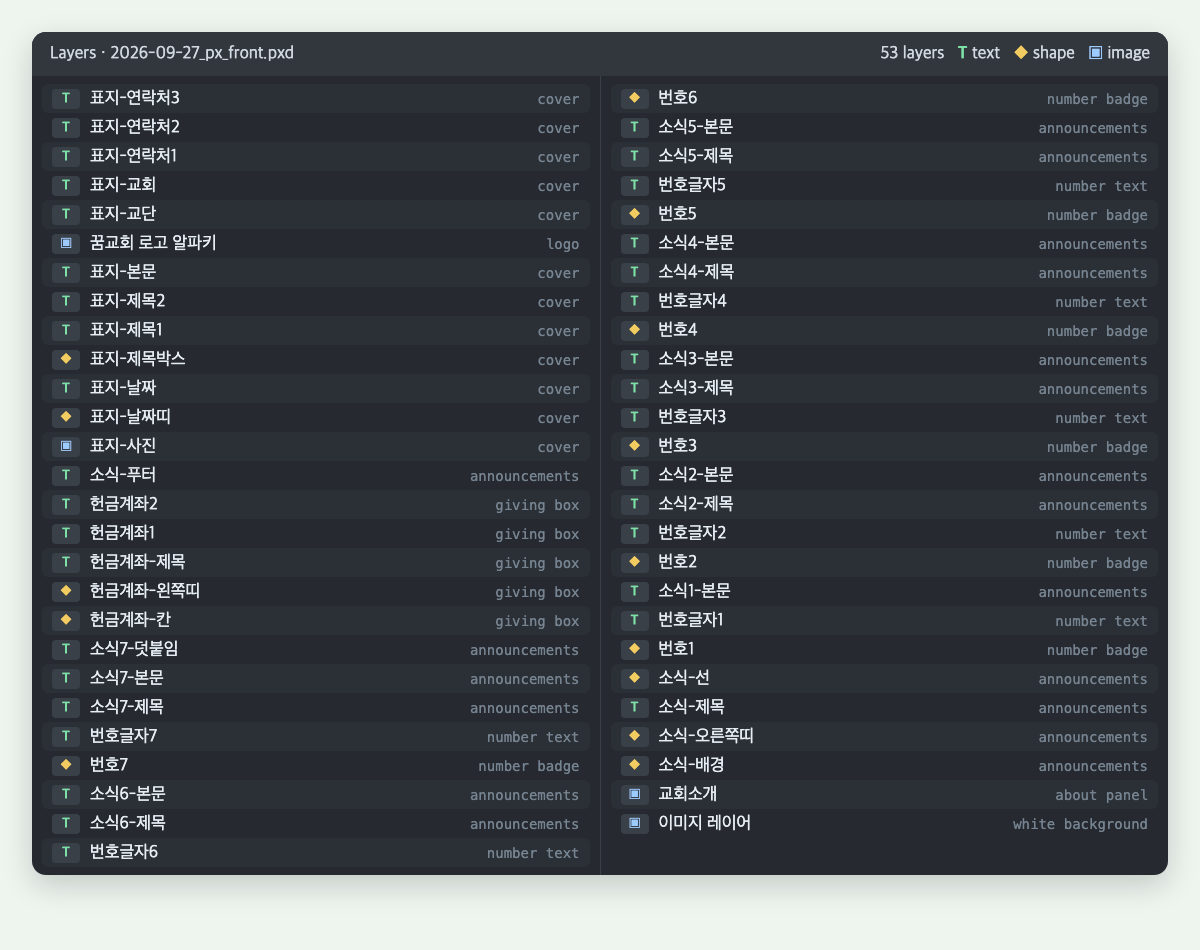
An early version of this put every line on its own layer, which was technically tidier and much worse to edit. I went back to one block per item. Worth remembering: the goal was not fewer layers, it was fewer obstacles between me and a small correction.
What broke in version 2
Scripting a design app is its own genre of problem. These are the ones that cost me real time.
- Line height is not exposed to the script. There is no property for it. What worked: build the document, save it, edit the line-height value inside the saved project file directly, and only then export the PDF. Order matters — export first and you export the wrong spacing.
- Letting the app wrap Korean text breaks words mid-syllable. Give a text layer a fixed width and it will happily split a word in the middle. I now compute the line breaks myself at word boundaries and pass the text with explicit newlines, with no width set.
- “At the end of layers” means the bottom. I built the whole front panel, exported it, and got a blank white page. The new document’s white background layer was sitting on top of everything I had added.
- Setting a shape’s fill color the obvious way does nothing. No error, no warning, no color. It has to be wrapped in a styles block. This is the same failure shape as the font bug: the script “succeeded” and the output was wrong.
- The app’s PDF export ignored resolution. It treated one pixel as one point, so a 600 dpi A4 document exported as a PDF measuring 2475 × 1750 mm — roughly eight times A4, and unprintable. I now export a PNG and wrap it in a PDF with the resolution set explicitly.
- Table rows do not grow. In HTML, a row with more content just gets taller. Here it silently overflows into the row below. The layout now measures required heights first and distributes only the leftover space — which is what saved us in late September, when the worship set had four songs instead of three.
One file, four destinations
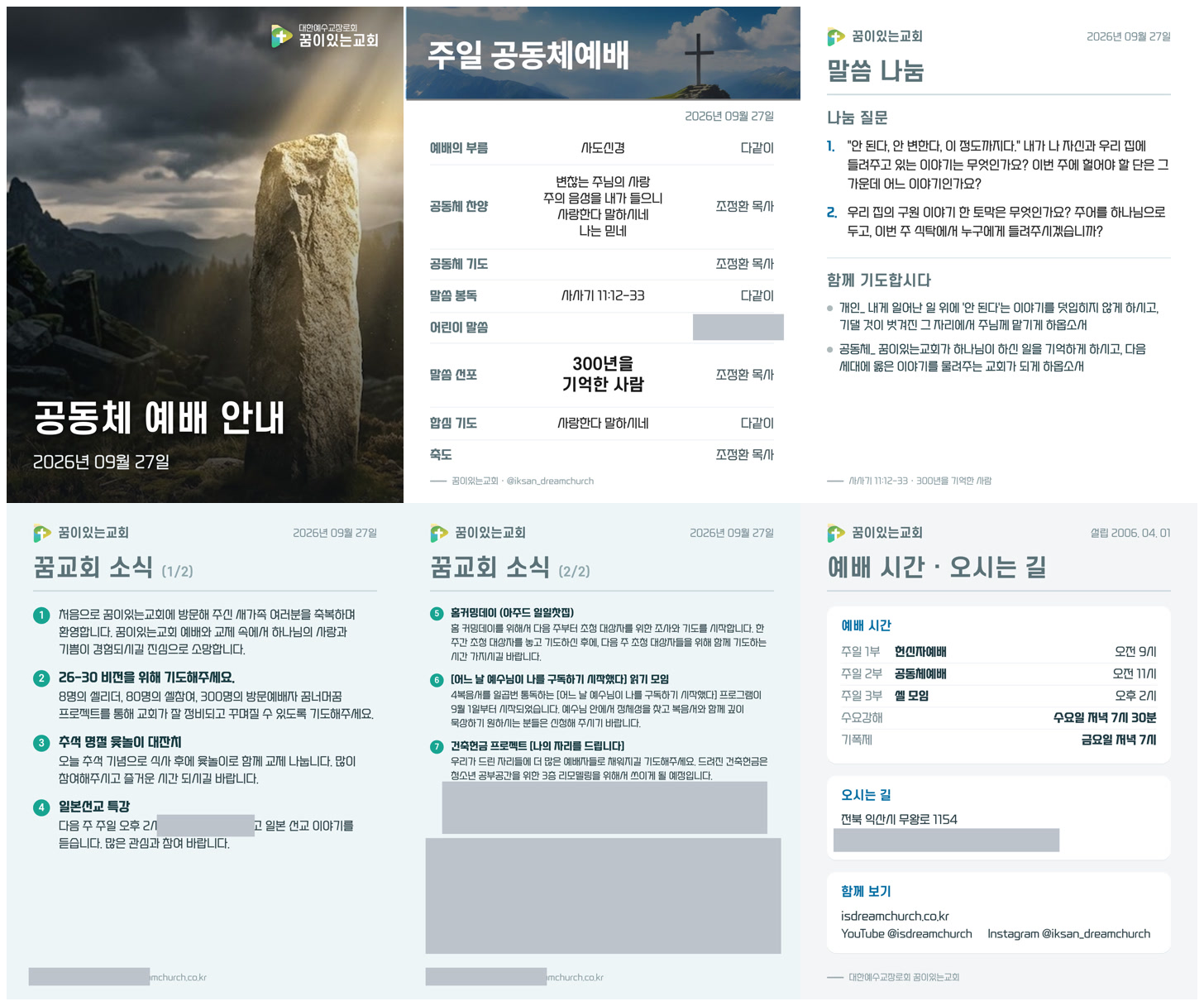
Once the week’s content lives in one file, the printed sheet stops being the only thing you can make from it. The same file now produces the print PDF, a set of 4:5 cards for Instagram, the bulletin post on our church website, and the title and description for the Sunday livestream on YouTube.
That last part is where social platforms taught me their own rules:
- Instagram rejected my cards for being too wide, not too large. A 2160 px PNG failed with a generic “only photo or video can be accepted” error. The file size was fine; the pixel width was not. Cards are re-rendered to 1440 px JPEG at upload time only — with chroma subsampling turned off, because these cards are almost entirely text and the default setting smears the strokes.
- A carousel caps at ten images. Go over and the post does not truncate — it fails. I spent five days assuming an authentication problem before checking the count.
- Uploading images and creating the carousel are not the same moment. Assemble the carousel immediately after uploading and you get “Media ID is not available,” because the platform is still fetching your images. You have to poll until each one reports ready.
The failure I caught the night before
This is the part I most want to hand to another pastor.
On Saturday night, 26 September, I finished the bulletin and scheduled three things for Sunday morning: the Instagram carousel at 8 a.m., the website post at 8 a.m., and the livestream going live at 10:50. Everything was registered. I could have gone to bed.
Instead I ran the website step once in preview mode, and it stopped immediately: bulletin image not found. The publishing step was still looking for the filename the old Chrome-based renderer produced. I had moved to Pixelmator a week earlier and that file simply does not exist anymore.
Nothing was wrong with the schedule. The scheduler would have fired correctly, the script would have exited with an error into a log file, and I would have found out at church — or later, when someone asked where the bulletin post was. The automation would have failed in the one mode that is worst for a one-person operation: silently, on a Sunday morning, while I was busy.
Two minutes of preview found it. So this is now a rule for me: a scheduled job is not “done” when it is registered. It is done when you have watched it run. If the real thing has side effects, run it in whatever dry-run mode you have. If you don’t have a dry-run mode, that is the next feature — not a nicer layout.
While I was in there, I also added a retry. Our website’s media import returned a server error on one of my two preview attempts. A transient failure at 8 a.m. on a Sunday, with nobody watching, is the same as a permanent one.
What I would tell another solo pastor
The real gift was not the saved hours. It was the boundary. Before, six panels competed for my attention equally every week. Now the file holds what changes and the assets hold what doesn’t, and I only look at the part that is actually this week’s work.
Automate the checking before the making. The single most valuable piece of this whole system is eight lines of code that ask whether the preacher is the same as last week. It addresses the mistake I actually made, which is a much better target than the mistake I imagined I might make.
Leave room for your hands. The more finished the automation got, the more I needed a way in. Moving to an editable document format was not a step backward; it was the step that made the automation usable on a Saturday night when one line needs to move and I am not going to rewrite data to move it.
Some decisions stay yours, and you should want them to. In late September our giving account information moved out of the announcement list and into its own fixed box at the bottom of the panel, so it stays in the same place regardless of how many announcements there are that week. No amount of automation would have proposed that. It came from a person looking at a printed sheet and deciding what a reader needs to find without hunting.
Our church is small. There is no communications team, no designer, no one to hand the Saturday night file to. That is exactly the situation where this kind of automation pays — not because it produces something a design team couldn’t, but because it moves the weekly work from “rebuild six panels and hope you caught everything” to “fill in this week, then read one thing the computer flagged.”
Sunday’s bulletin is printed. The preacher’s name is correct.